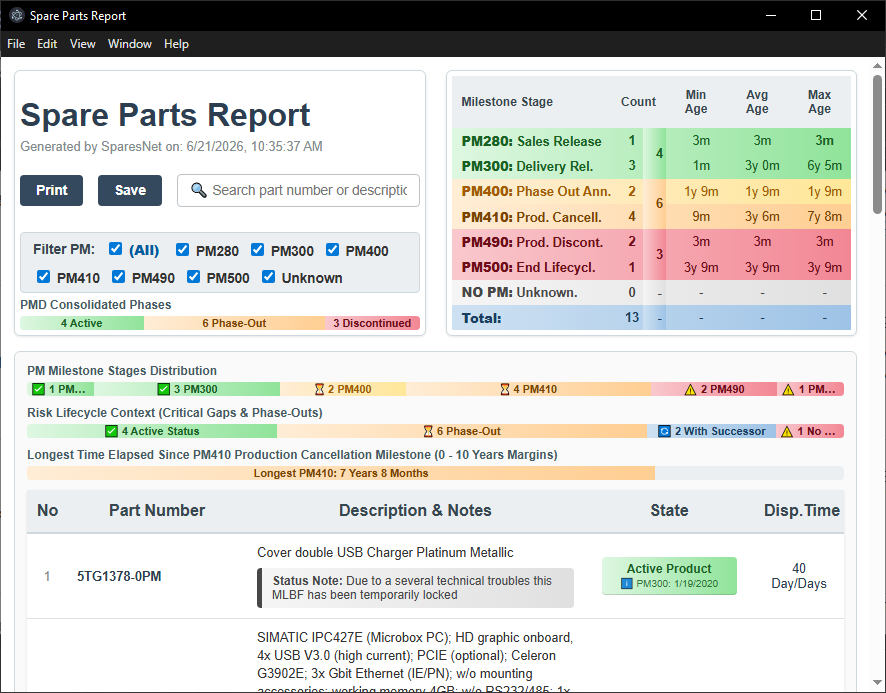
SparesNet is a portable desktop application designed to evaluate the life-cycle status and availability of Siemens Industry automation products using their part numbers (MLFB).
Starting from the older macro-enabled Excel solutions (SparesWeb.xls, no longer operational), SparesNet provides a modern stand alone interface powered by Electron/Vite/Puppeteer and dynamic spreadsheets.
Interface Description

- Clear All: Wipe the entire spreadsheet dataset.
- Clear Data: Delete data cells content while retaining original codes (first column).
- Import from Excel: Import data from an existing Excel file (from 'Data' sheet if available, otherwise from the first sheet).
- Export to Excel: Export data into a clean, new Excel file.
- Read All with successors (Wizard): Sort all rows by MLFB codes, pull web data, check for successors, and display a structural lifecycle report.
- Sort by MLFB: Alphabetically organize all rows by product codes.
- Sort by Column: Sort data records by your currently selected dynamic column property.
- Read Row: Pull live updates exclusively for the highlighted active row.
- Read All: Read target information for all items (without checking for successor updates).
- Successor for Row: Inserts a new row directly if an online successor is available.
- Successor for All: Scans items sequentially and insert new lines if successors are available.
- Preview report: Generate and display a preview of a HTML report for the actual data.
- Export report to HTML: Generate and save a HTML report for the actual data.
- Export report to PDF: Generate and save a PDF report for the actual data.
- Spares On Web: Quick jump to the component's entry page on Siemens Spares on Web (SOW).
- Industry Mall: Quick jump to the component's entry page on Industry Mall.
- SIOS: Quick jump to the component's entry page on Siemens Industry Support (SIOS).
Quick Start Guide
Enter, into the first column, the MLFB codes (order numbers) of the parts to analyse. You can enter the codes manually, copy and paste them from an existing Excel or LibreOffice Calc spreadsheet, or import them from an existing Excel file.
After finalizing your lookup configuration, select the Read All with successors (Wizard) command feature. The tool pipeline auto-arranges rows, read web data for all rows, checks each part for a successor part, read web data also for these parts, and compiles an overall report regarding availability of the parts.
Lifecycle Report
Generate high-fidelity web visual assets or PDF documentation frameworks showcasing immediate component lifecycle statuses. The pipeline delivers quick visual feedback indicating structural end-of-support countdowns and successor availability timelines seamlessly.